
How Do I Manage My Clan?
Recruiting members, inviting members, kicking out the troublemakers and giving your clan a funny description... all of this comes under the heading of clan management.
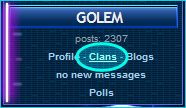
Clan Management is accessed through your Profile under the Clans tab.
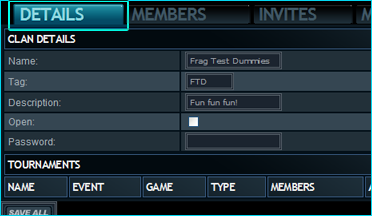
Here you view and edit the main info about your clan - name, tag, description and privacy options. To update:
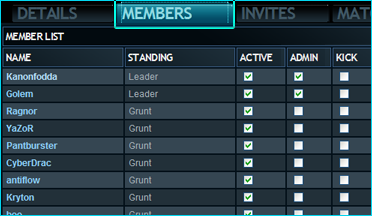
Here's all your clanmates! There are three checkboxes for each allowing you to indicate if they're active, if they can also manage the clan or if you want to kick the player. To make any changes:
Is your clan lacking in members? Anyone who has earmarked themselves as a mercenary appears in this list - a list of potential new recruits for you. As well as who's up for grabs, you can also see the other clans they're currently working for. When sending invites, you can add a message and when you want the invite to expire. To invite a mercenary:
Note - Clans sharing players cannot play in the same tournament.
The use of the Matches tab is detailed in the tutorial 'How do I enter scores for matches?'
Clan Management is accessed through your Profile under the Clans tab.
- Find your summary panel at the top left of the LlamaLAN website.
- Click the Clans link.
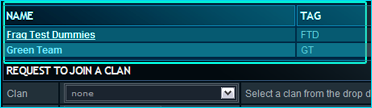
The first section on the Clans tab is a list of all clans to which you belong. If you are a clan leader, you can begin managing your clan from here.
- To begin managing your clan, click its name - e.g. Frag Test Dummies.
Details Tab
Here you view and edit the main info about your clan - name, tag, description and privacy options. To update:
- Adjust the details as described.
- Save the changes with the Save All button.
Members Tab
Here's all your clanmates! There are three checkboxes for each allowing you to indicate if they're active, if they can also manage the clan or if you want to kick the player. To make any changes:
- Mark your players as appropriate to suit your clan's needs.
- Save the changes with the Save All button. At the point of saving, players marked 'Kick' will be booted from the clan.
Invites Tab
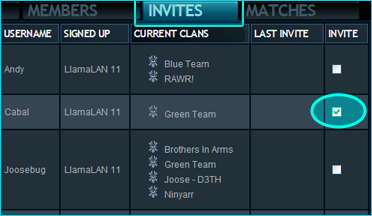
Is your clan lacking in members? Anyone who has earmarked themselves as a mercenary appears in this list - a list of potential new recruits for you. As well as who's up for grabs, you can also see the other clans they're currently working for. When sending invites, you can add a message and when you want the invite to expire. To invite a mercenary:
- Check the box in the Invite column.
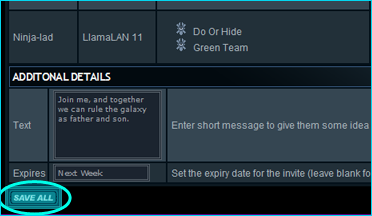
- Add a message in the Text field.
- Enter a date of expiry in the Expires field. You can also use strings like 'tomorrow' and 'next week'.
- Send the invitation(s) with the Save All button.
Note - Clans sharing players cannot play in the same tournament.
Matches Tab
The use of the Matches tab is detailed in the tutorial 'How do I enter scores for matches?'
I hope that answers your questions on managing your clan - although if you came here looking for help keeping your clanmates under control... you're on your own there. 
There is a forum especially for clan leaders looking for members - open the forums and find the Recruiting board!
There is a forum especially for clan leaders looking for members - open the forums and find the Recruiting board!